In our last blog post we created a super simple RAG example with Ollama, a JSON file and Javascript, see here. In this post we are going to do a more ‘realistic’ approach.
In this example we will build a small demo app using Azure Foundry, a .NET backend, a PostgreSQL database for embeddings and docker desktop to run all this.
You can download the sample code here: https://github.com/agentic-ai-info/AzureRAG
The Core Purpose of RAG
Think of RAG as a two-step process:
- Retrieve the most relevant pieces of your data for a user question.
- Generate an answer using those retrieved snippets as context.
This means you can ask questions like:
- “How do I configure feature X?”
- “What are the supported integration limits?”
- “Which steps are required after installation?”
…and the model answers based on your embedded documents, not generic internet-style guesses.
For customer-facing scenarios, this is huge: you get more precise answers, better consistency, and easier control over what information the model uses.
Demo App Overview
Before we can start with the demo application you will need a few prerequisites:
Get the sources here: https://github.com/agentic-ai-info/AzureRAG
You will also need Docker Desktop to run the containers: https://www.docker.com/products/docker-desktop/
To run the data import script you will need python.
And you will need a Azure Foundry resource where you can deploy two models. Before you can run the sample code you will have to create two endpoints in Azure Foundry. You can follow this blog post to get started: How to Create an Azure AI Foundry Resource
The demo uses two Azure Foundry endpoints and two models:
- Chat model: e.g gpt-4.1-mini
- Embedding model: e.g. text-embedding-ada-002
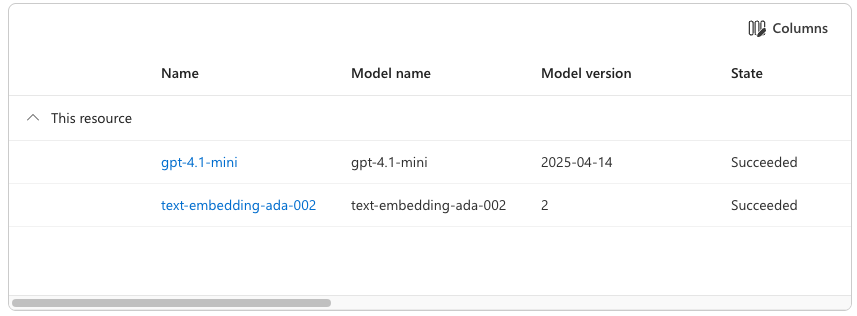
You need to add your model endpoints and the api key to a .env file, you can copy .env.template to have a starting point.
Our demo app consists of the following parts:
- ASP.NET API backend
Exposes endpoints to store embeddings and query the system. - PostgreSQL with pgvector
Stores document chunks and vectors, and performs nearest-neighbor search. - Azure Foundry client integration
Calls Azure-hosted models for embeddings and answer generation. - Chunking script
A Python script reads a text file, chunks it, and sends chunks to the API for embedding/storage.
High-level flow
- A document (for example user documentation) is split into chunks.
- Each chunk is converted into a vector embedding.
- The text + metadata + vector are stored in PostgreSQL.
- A user question is embedded the same way.
- Vector search finds the nearest chunks.
- Those chunks are passed as context to the chat model.
- The chat model returns a final answer.
That is the RAG loop in action.
How to Run the Demo in 3 Steps
If you want to try this RAG pipeline yourself, here is the fastest path:
1) Start the stack
docker compose up --build -dThis starts PostgreSQL (with pgvector) and the ASP.NET API.
2) Import the demo knowledge base
python3 scripts/embed_file.py scripts/demo-data.txt --source demo-dataThis reads the demo text, chunks it, creates embeddings via Azure Foundry, and stores vectors in Postgres.
3) Ask a question
curl -X POST http://localhost:5001/query \
  -H 'Content-Type: application/json' \
  -d '{"question":"What is the best month to travel?"}'
You should get an answer grounded in the imported document (e.g. spring: April–June, and early autumn: September–October).
API Calls to Azure Foundry in This Demo
Both Azure Foundry calls can use the same API key, as long as both model deployments live in the same Azure resource.
Authentication is sent via the api-key header.
1) Embeddings API call
This call is used in two places:
- when ingesting document chunks
- when embedding the user’s question for retrieval
Request pattern
POST .../embeddings?...- JSON body contains input (the text to embed)
The solution contains s small python script you can use to embed any text file you want. A small, fictional travel guide is also attached (demo-data.txt) which can be used to test the solution.
Response pattern
data[0].embeddingreturns the numeric vector- with text-embedding-ada-002, that vector has 1536 dimensions
What does 1536 dim vector mean?
The model represents each text chunk as a point in a 1536‑dimensional mathematical space. A higher‑dimensional vector gives the model more “room” to encode nuance. But that does not automatically mean “better RAG”.
| Smaller (e.g., 384, 512) | Fast, cheap, small index, good for short texts | Less semantic nuance |
| Medium (768–1536) | Strong general-purpose semantic quality | Larger index, slower |
| Large (2048–4096+) | More expressive, better for long/complex texts | Much heavier compute, diminishing returns |
text-embedding-ada-002 at 1536 dims became popular because it hit a strong balance of: semantic quality, speed, cost and compatibility with vector DBs.
The resulting vector is stored in pgvector and later used for similarity search.
2) Chat Completions API call
This call is used after retrieval, to generate the final grounded answer.
Request pattern
POST .../chat/completions?...- JSON body contains messages, typically:
- a system instruction
- a user message that includes both retrieved context and the question
Response pattern
- choices[0].message.content contains the final answer text
In short
- Embeddings endpoint: finds the most relevant context
- Chat endpoint: writes the final answer using that context
Why This Matters in Real Projects
RAG is one of the most practical ways to put LLMs into production without fine-tuning:
- You can update knowledge by updating documents (not retraining models).
- You can keep answers aligned with your own product/domain wording.
- You can add metadata, filtering, and source traceability.
For support teams, onboarding portals, or technical documentation assistants, this architecture is often the fastest path to value.
Final Notes: Cost and Data Responsibility
Two important reminders before trying this:
- Azure Foundry costs money
Every embeddings and chat call consumes tokens/resources.
Monitor usage and set budgets/alerts. Doing the embeddings for this example and sending a few test questions cost me exactly €0.01 in my Azure subscription. Interestingly, building the code itself used about 3% of my monthly Copilot request quota — so writing the code was actually more expensive than running it. - Be careful with data and code
Never send sensitive data blindly to APIs and avoid publishing secrets (API keys, endpoints with credentials, internal data) in repos or logs.
Leave a Reply